Power Guide: Generation & Grid Setup
Power enables buildings and devices in Abiotic Factor to operate, route energy, and store charge; managing generation, distribution, and storage efficiently is critical to base functionality and defense.
Power consumers and connectors
- Many devices require a cable connection to receive power. Cables connect sources, storage, and consumers; plug strips/plug boards allow one output to feed multiple devices.
- Devices provide a fixed number of cable slots which determines how many separate connections they can host:
- Glow Shard: provides 6 cable slots.
- Exor Straps: provides 3 cable slots.
- The Alarm Clock acts as a manual power switch: it can turn power on and off for any devices connected to its power-cord-side. Multiple devices can be controlled together when they are connected via a Plug Strip or Plug Board to the alarm clock.
Power storage
- Some structures function primarily as compact, high-density power storage devices. They are intended to store charge and supply power to connected devices when generators are offline or demand spikes. These compact storage crates are designed to be space-efficient: their internal capacity for storing energy is larger than their external footprint.
Specialized powered devices
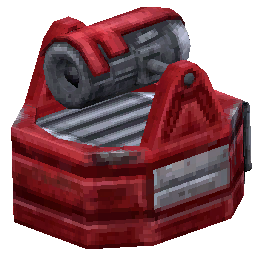
- The Armory Locker is a defensive device that requires external laser input to operate: it will shoot a laser beam at enemies that enter its range, but only when a laser beam from a Laser Emitter or Laser Prism is aimed at the crystal in the locker’s base. The Armory Locker still requires power connectivity to enable its behavior.
Best practices
- Match cable slot counts to device needs: use devices with sufficient slots (Glow Shard, Exor Straps) as hubs when multiple consumers need direct connections.
- Use Alarm Clocks to group-control power to sections of your base; pair them with Plug Strips/Plug Boards to minimize wiring and toggle many devices at once.
- Place compact storage crates near high-demand areas to buffer short-term power spikes and reduce transmission length.
- For defensive setups that rely on laser-based weapons (Armory Locker), ensure both electrical power and a direct laser line (
Troubleshooting tips
- If a device is not drawing power, verify:
- It is connected to a powered line and has an available cable slot.
- Any controlling Alarm Clock is switched on.
- For laser-activated devices, the required laser beam is being delivered and aimed correctly.
- When many devices are connected through a single hub, monitor load and storage so generators and compact storage crates can supply bursts without outage.
Pages featured in this guide
- itemBattery (Carbon)
- itemBattery (Industrial)
- itemBattery (Makeshift)
- itemBattery (Quantum)
- itemBench Press
- itemCapacitor
- itemCharging Crate
- itemCharging Pad
- itemCoil Winding
- itemDatabase Terminal
- itemDistribution Pad
- itemExercise Bike
- itemHeater
- itemLaser Power Converter
- itemPest Wheel
- itemToroidal Power Transformer