Logistics Guide: Cargo Ships, Warehouses & Trains | Guide
Cargo logistics in FOUNDRY covers the systems you use to move large quantities of items across your base and to off-world destinations: trains, cargo ships, warehouses, and special handling for construction materials. Efficient logistics keeps production lines fed, prevents idle unloaders, and ensures modular builds complete on schedule.
Overview
Logistics solutions trade off throughput, range, and complexity. Use belts and Mk3 conveyors for short to medium hauls, trains for continuous heavy transfer over long land distances, and cargo ships for point-to-point bulk transfer across space where belts/trains can’t reach. Warehouses and specialized containers shape flow, prevent blocking, and unlock certain operations (like modular construction).
Cargo Ship system
Cargo ships move large stacks of items between a Cargo Ship Start Pad (origin) and a Cargo Ship Target Pad (destination). There are two pad types: Start Pads send cargo, Target Pads receive. Ships now queue and take turns — only one ship can offload at a Target Pad at a time.
Key points:
- Throughput varies with distance between pads; longer routes can reduce effective throughput, so account for distance when planning.
- A single Target Pad’s practical max output is approximately 4800/min when fully fed (this assumes you are using all 20 ports and MK3 belts). Do not route more than this to a single Target Pad; instead build a second Target Pad to handle overflow.
- Any number of Start Pads can supply a single Target Pad; ships originating at multiple Start Pads will queue and take turns offloading at the Target Pad.
Practical tips:
- Spread Start Pads across your network rather than overloading one long route.
- For very large bases, use multiple Target Pads to avoid the per-pad cap.
- Be aware of queuing delays — if you need steady continuous receipts at the Target Pad, ensure enough Start Pads or stagger departure schedules.
Warehouses and throughput management
Warehouses are essential for buffering and maximizing ship operations.
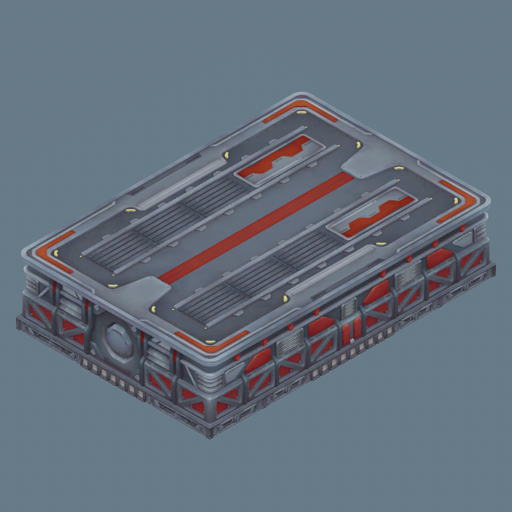
- Transport Ships will only undertake missions to serve the SSRW if there is sufficient free space in that Warehouse. To keep ships active, you must empty the Warehouse quickly.
- Surround the SSRW with multiple unloaders (for example 8 or 12 unloaders) to prevent ships idling and to maximize throughput.
- Full throughput typically requires coordinated ship traffic: half the ships bringing items up to sell at the Space Station, and the other half bringing specific goods (e.g., Firmarlite Bars) down. Design your unload/load layout and ship cadence around this balance.
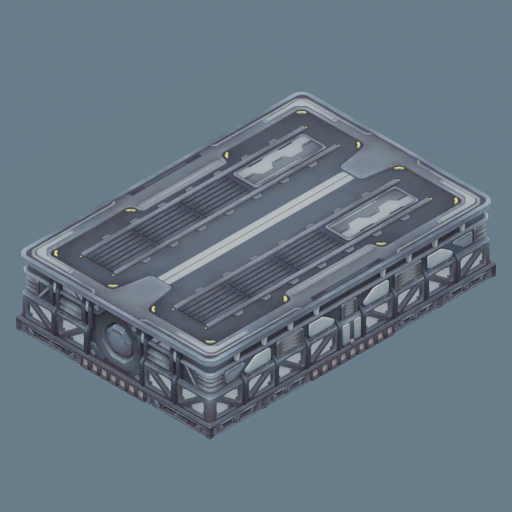
- Construction materials should not be stored in regular Storage containers because of their low stack sizes.
- Place construction materials inside a Construction Warehouse where they will stack to 25,000 items. This is the only storage that allows Transport Ship Ports to access construction materials for building modular structures.
- Note the Construction Ship Port is required to perform the actual building of modular structures; the Transport Ship Port only delivers construction items to the build site.
Practical tips:
- Keep SSRW and Construction Warehouses fed and emptied aggressively. If either fills up, ships will idle or stop missions.
- Use multiple unloaders and fast conveyors (MK3) on warehouse perimeters to match incoming ship rates.
Integration with belts and trains
- Conveyor throughput feeding ship ports or warehouses must match the expected ship supply. The stated Target Pad cap of ~4800/min assumes use of MK3 belts and all available ports; slower belts lower effective throughput and increase queues.
- Trains are the go-to for moving continuous large volumes of goods over land. Use trains to aggregate from distant production hubs into centralized warehouses or Start Pads for ships.
- Plan transfer hubs where trains, belts, and ship pads interface, using ample buffer storage and parallel unloaders to avoid chokepoints.
Design patterns and troubleshooting
- Avoid funneling more than ~4800/min to one Target Pad; distribute across multiple Target Pads.
- If ships are idle: check Warehouse free space, number and speed of unloaders, and whether conveyors feeding the pad are saturated or blocked.
- For modular construction delays: confirm construction materials are in a Construction Warehouse and that a Construction Ship Port is present to perform builds.
- When scaling up, prefer multiple smaller parallel pads/warehouses to a single oversized node; parallelism reduces queuing and local distance penalties.
Quick checklist before deploying cargo ships
- Are Start Pads and Target Pads placed to minimize distance where possible?
- Are conveyors feeding pads upgrading to MK3 where you expect maximum throughput?
- Is each Target Pad protected from over-sourcing by keeping expected inflow below ~4800/min?
- Are SSRW and Construction Warehouses sized and fed/unloaded with enough unloaders to keep ships active?
- Have you provided Construction Ship Ports where you expect modular construction to occur?
Use this guide to balance ship count, pad placement, warehouse layout, and feeder networks. Properly configured, cargo ships and warehouses let you move massive quantities reliably and keep large-scale factories running smoothly.